
With the “Member of VKontakte community” condition, you can check whether a user is a subscriber of your community. This allows you to grant bonuses, provide access to content, filter traffic, increase engagement, and grow the number of subscribers.
How the condition works
The condition checks whether the user is subscribed to the specified VKontakte community.
- If subscribed → proceed along the “Yes” branch
- If not subscribed → proceed along the “No” branch
The check works only for the VKontakte channel.
How to add the condition
- Open your bot.
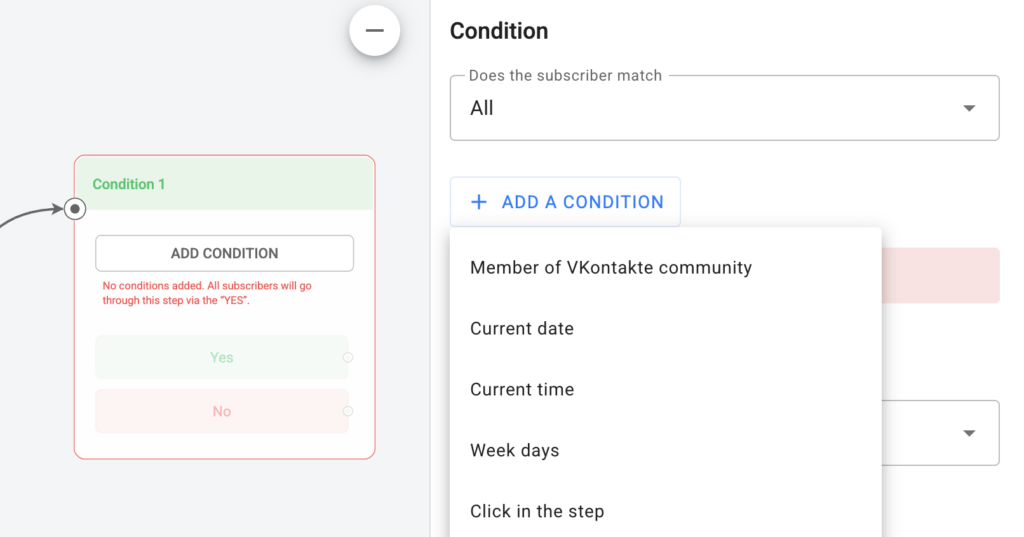
- Add a “Condition” step.
- Select the check type “Member of VKontakte community”. You do not need to select a community — the check always applies to the community connected to your VKontakte channel.
- Configure the “Yes” and “No” branches.
Typical scenarios
- Bonus for subscribing
You check the subscription → if “No”, you offer the user to subscribe → then run the check again → grant the bonus.
- Access restriction
Access to the next step, lesson, file, or discount is available only to subscribers.
- Warm-up through subscription
The user enters the bot, receives motivation to subscribe, and then is moved to the main funnel.
You can set up a reaction to a comment under a VKontakte post using the link to the instructions.
Important: at the moment you can only check the subscription; adding or removing users from a VKontakte community is not possible.
If you haven’t found the answer to your question, contact us in the chat in your profile or email hello@bothelp.io
Get 14 days of full functionality of BotHelp, a platform for creating broadcasting, autofunnels, and chatbots.