
You Can Create a Bot for One Messenger and Then Convert It to Another
Conversion Limitations
Keep in mind that each messenger has its own requirements: message text length, button types, attachments, and so on. For example, it is currently not possible to copy a bot created for Instagram* to any other messenger.
During conversion, only elements supported by the new bot type are transferred. All other elements are removed.
-
If the bot contained a transition to another bot, this link is also removed.
-
If a step has a condition to transition via a link, you will need to select this step again in the new bot.
-
Pay attention to the character limit for button names: it varies by messenger. We recommend limiting button names to 20 characters.
After conversion, you need to review the bot and edit any inconsistencies.
How to Convert a Flow
-
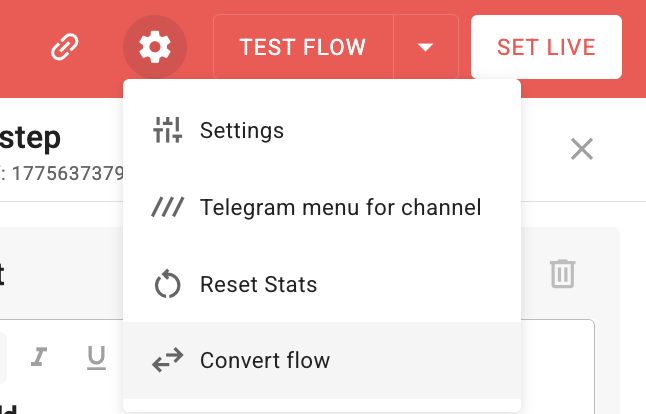
Open your multi-step bot and click on the settings icon.
-
Select “Convert flow”.
-
Enter a new name for a flow.
-
Choose the channel for which you want to create a flow.
-
Click the Convert button.
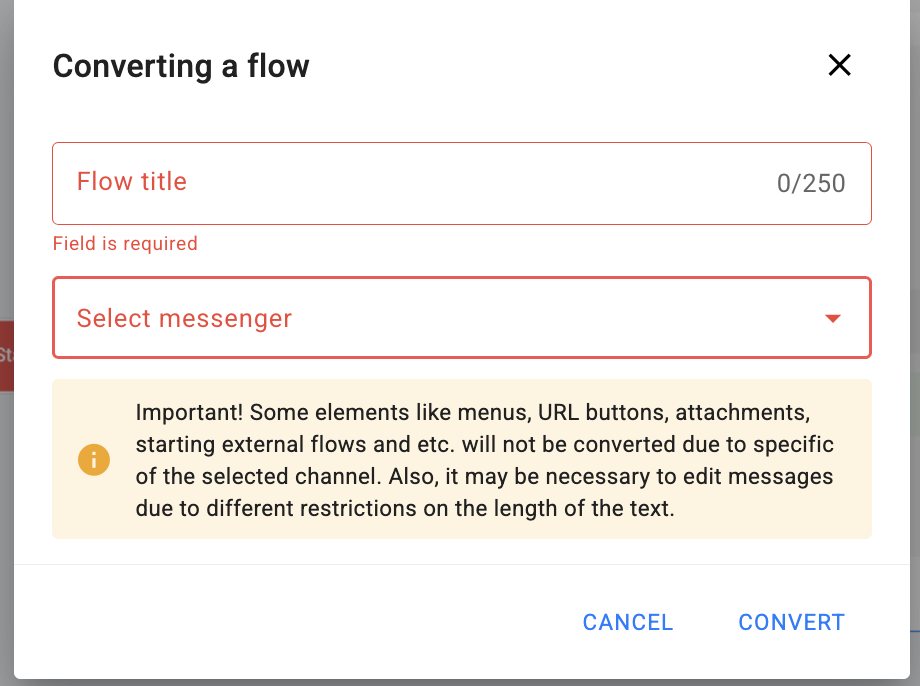
Conversion takes some time.
After successful conversion, you will see a message confirming the process and a link to the newly created flow.
You can follow the link and edit the flow.
*Belongs to Meta, an organization banned in the territory of the Russian Federation.
If you did not find the answer to your question, feel free to contact us in the chat inside your dashboard, message us on Telegram at @BotHelpSupportBot, or email us at hello@bothelp.io.
Enjoy the full functionality of the BotHelp platform for creating broadcasts, automated funnels, and chatbots — free for 14 days.