
The Deal in amoCRM function allows you to create deals in a specified pipeline at a specified stage and initiate dialogue transfer. The function is triggered when a specified event occurs in the conversation with the subscriber:
- The subscriber confirmed their desire to sign up for an online consultation/trial lesson/in-person meeting.
- Or any other event.
How to enable the function
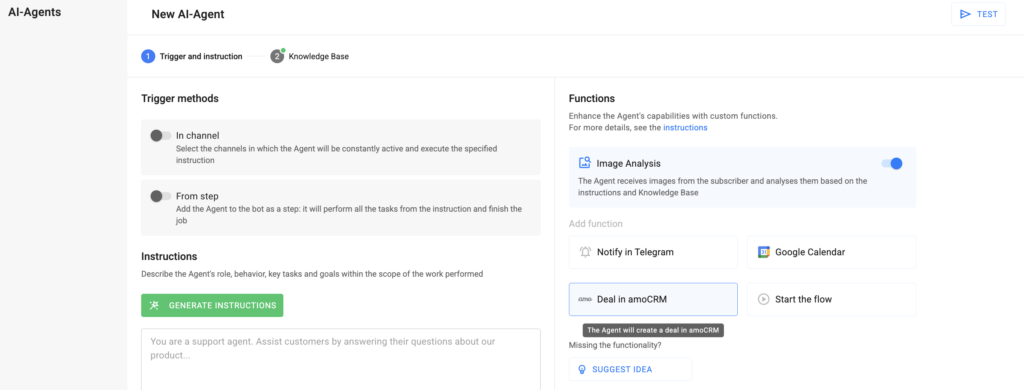
1. At the first step of AI-Agent setup, in the Functions section, select the Deal in amoCRM card.
2. Connect the amoCRM integration:
- Click the Connect Integration button.
- An amoCRM window will open.
- Select the required amoCRM account and click Allow.
3. Configure the function parameters:
- When should a deal be created
— Describe the trigger, e.g., “subscriber confirmed their desire to sign up for an online consultation,” or other triggers according to your business logic. - Which pipeline to add the deal to
— Select a pipeline from your amoCRM account. - To the stage
— Select the pipeline stage from your amoCRM account. - Transfer messages to amoCRM
— Enable the checkbox if you want the dialogue to be transferred to amoCRM along with the created deal. - Transfer fields
— Map the fields from the subscriber’s profile card that you want to send to amoCRM.
Save the function. Congratulations! The function has been successfully configured. Don’t forget to test it before launching it for all subscribers.
Function Details
— When message transfer to amoCRM starts, a system notification “Dialogue transfer to amoCRM started” will appear in the conversation with the subscriber. You can stop the transfer by clicking Stop Transfer in the conversation.
— If you want to pause the function, you can do so using the toggle on the card without deleting it.
— The function can be added multiple times to the Agent. This is useful when different events require creating deals in different pipelines or at different stages.
If you did not find the answer to your question, feel free to contact us in the chat inside your dashboard, message us on Telegram at @BotHelpSupportBot, or email us at hello@bothelp.io.
Get 14 Days of Full Access to the Platform
Enjoy the full functionality of the BotHelp platform for creating broadcasts, automated funnels, and chatbots — free for 14 days.