
A deeplink is a link that directs a user to a specific step of a specific bot. This feature reduces the number of intermediate actions and helps the user reach the required step of the bot with a minimal number of clicks.
Deeplinks are available only for bots in Telegram and MAX.
You can create a direct link (deeplink) that takes the user straight to a step with an AI-agent.
Learn more about setting up an AI-agent in the article.
How to create a deeplink
- In the bot builder, enable edit mode.
- Open the required step for editing.
- In the side menu, click the “⋮” icon next to the step name.
- Select «Add deeplink».
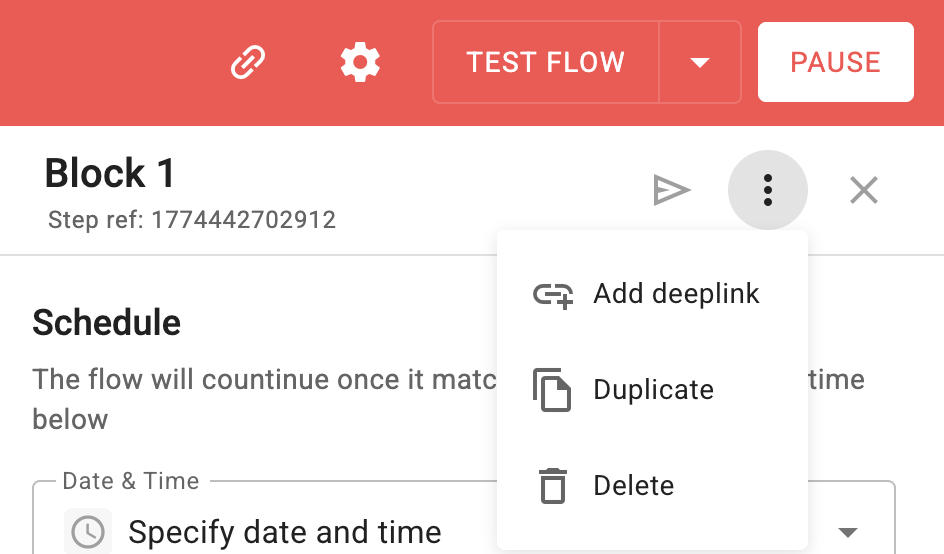
A generated link will appear in the step, which you can copy to the clipboard or delete. Only one deeplink can be created per step.
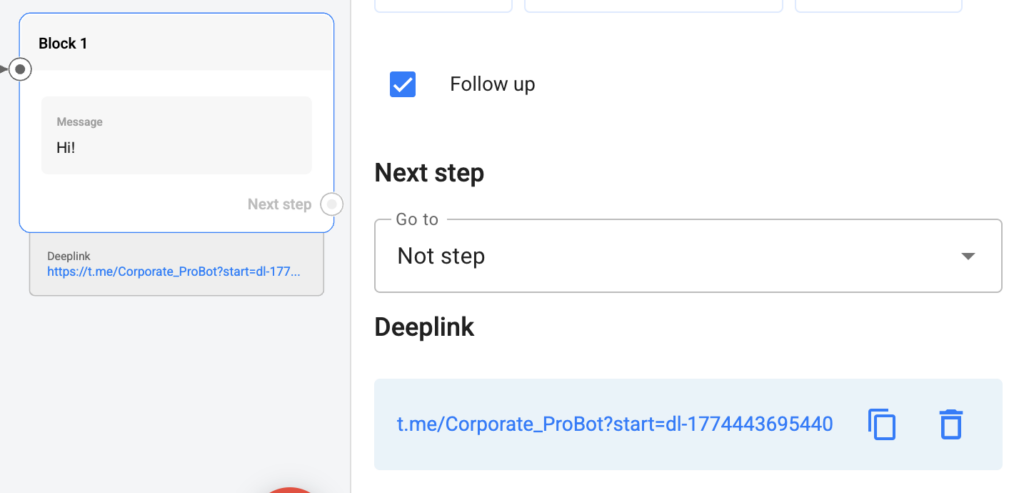
Copying a deeplink
To copy a deeplink and use it to attract subscribers, you need to:
– In view/edit mode, hover over the deeplink card in the step and click the copy button.
or
– In edit mode, open the step with the deeplink.
– In the «Deeplink» block, click the copy button.
Deleting a deeplink
To delete a deeplink, you need to:
– In edit mode, open the step with the deeplink.
– In the «Deeplink» block, click the delete button.
– Confirm your action in the pop-up window.
The deeplink will be deleted.
After deletion, the link will no longer be accessible to users. To restore it, create a new deeplink for the step.
Users who follow a deleted deeplink will be taken to the channel and will be able to start the bot that launches in the channel by pressing the start button.
Important: when changing the channel for the bot, all deeplinks will be deleted.
- Deeplink cards are not displayed in the bot demo mode.
- When copying a bot or a step, deeplinks are not copied.
Important: UTM parameters cannot be passed via deeplinks. To pass UTM parameters, you can use a direct link to launch the bot. Learn more about how to set this up in the article.
If you did not find the answer to your question, feel free to contact us in the chat inside your dashboard, message us on Telegram at @BotHelpSupportBot, or email us at hello@bothelp.io.
Get 14 Days of Full Access to the Platform
Enjoy the full functionality of the BotHelp platform for creating broadcasts, automated funnels, and chatbots — free for 14 days.