
The Start the flow function allows you to start bots and auto-campaigns for a subscriber when a specified event occurs in the conversation:
- The subscriber wants to join a private club;
- The subscriber is ready to pay for a product;
- The subscriber wants to attend an intensive;
- Or any other event.
How to enable the function
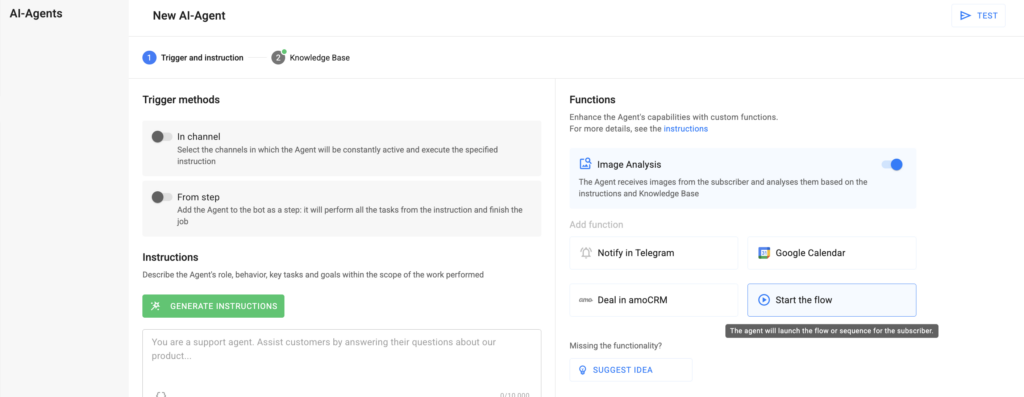
1. At the first step of AI-Agent setup, in the Functions section, select the Start the flow card.
2. Configure the function parameters:
- When should a flow be started
— Describe the trigger (for example, “Subscriber wants to join the Private Club” / “Subscriber wants to pay” or other triggers relevant to your business logic). - Which flow or sequence to launch
— You can specify multiple bots and auto-campaigns. Only the bots or campaigns that the subscriber has agreed to (is subscribed to) will be launched. Bots can be started from any step, while auto-campaigns can only start from the first step.
Save the function. Congratulations! The function has been successfully configured. Don’t forget to test it before launching it for all subscribers.
Function Details
— If you want to pause the function, you can do so using the toggle on the card without deleting it.
— The function can be added multiple times to the Agent. This is useful when different events require launching different bots or auto-campaigns.
If you did not find the answer to your question, feel free to contact us in the chat inside your dashboard, message us on Telegram at @BotHelpSupportBot, or email us at hello@bothelp.io.
Get 14 Days of Full Access to the Platform
Enjoy the full functionality of the BotHelp platform for creating broadcasts, automated funnels, and chatbots — free for 14 days.