
- The function allows receiving and analyzing images sent by subscribers according to the instruction and Knowledge Base.
- The function is triggered when a subscriber sends images in the chat with the Agent.
Use Cases
- Appearance Analysis (beauty, fashion, personal brands)
How it works: The client sends a photo in the chat with the Agent → AI-Agent analyzes the appearance using the photo and materials from the Knowledge Base and instruction → The Agent sends personalized recommendations in the chat. - Nutrition and Food Analysis by Photo
How it works: The client sends a photo of a dish in the chat with the Agent → AI-Agent analyzes the composition and calorie content using the photo and materials from the Knowledge Base and instruction → The Agent sends nutrition recommendations in the chat. - Interior / Object Analysis (real estate and design)
How it works: The client sends a photo of a space in the chat → AI-Agent analyzes the condition and style using the photo and materials from the Knowledge Base and instruction → The Agent sends recommendations in the chat. - Payment Confirmation
The client pays for a product and scans the receipt → The client sends a photo of the receipt in the chat → AI-Agent analyzes the receipt → The Agent confirms the payment.
How to enable the function
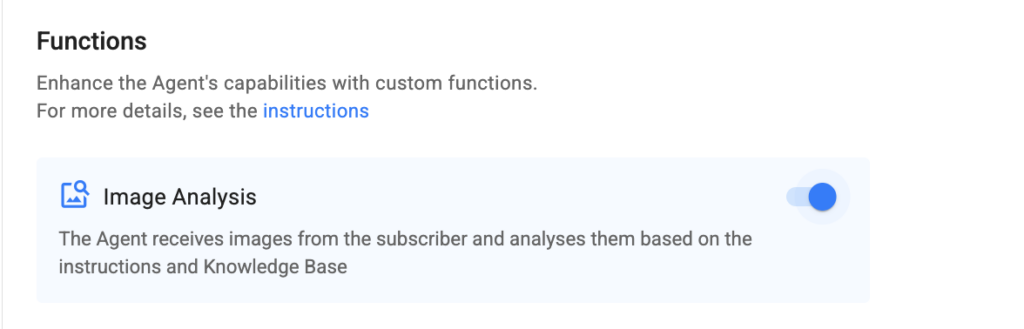
- Add rules for analyzing subscriber images to the instruction or Knowledge Base.
- Activate the Image Analysis function.
- Congratulations! The function has been successfully configured. Don’t forget to test it before launching it for all subscribers.
Function Details
— The Agent can analyze image galleries for channels in Telegram and VKontakte; for other channel types, only single images can be analyzed.
— If the function is disabled, the Agent will not analyze images, tokens will not be spent. An automatic message will be sent in response to subscriber images: “Unfortunately, I cannot process attachments. Please provide information in text form, and I will be happy to help!”
If you did not find the answer to your question, feel free to contact us in the chat inside your dashboard, message us on Telegram at @BotHelpSupportBot, or email us at hello@bothelp.io.
Enjoy the full functionality of the BotHelp platform for creating broadcasts, automated funnels, and chatbots — free for 14 days.
Была ли статья полезна?
Спасибо за обратную связь!