
The Notify in Telegram function allows you to send a notification to a live operator in Telegram when target events occur in a conversation:
- The subscriber asked to be connected to an operator.
- The subscriber shared contact details.
- The subscriber is ready for a consultation.
- The subscriber provided the expected answer to a question.
- The subscriber completed qualification and became a potential lead.
- Or any other condition.
Notify in Telegram allows you to instantly involve a manager in conversations where it is truly necessary, without losing an engaged client.
How to enable the function
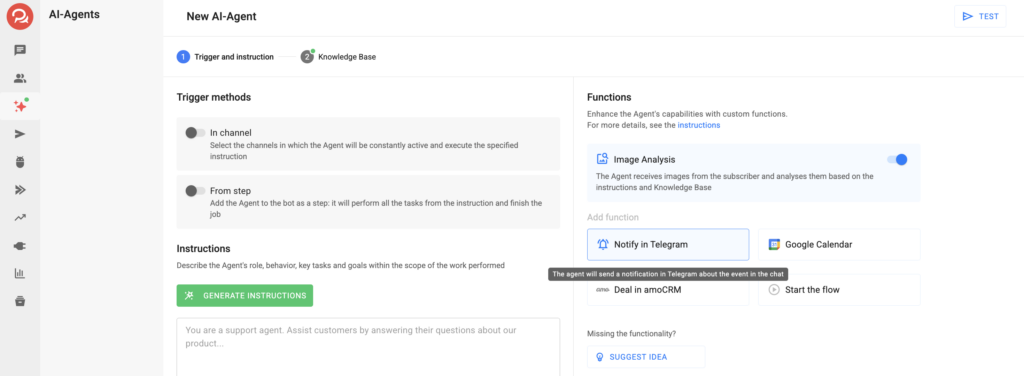
- At the first step of AI-Agent setup, in the “Functions” section, select the Notify in Telegram card.
- Configure the function parameters:
- When should the notification be sent
— describe the trigger: a request to call an operator, sharing contact details, specifying a budget, etc., according to your business logic. - Which channel and to whom should the notification be sent
— select the Telegram bot to which the message will be sent.
The bot must be connected in the account in advance and may differ from the bots used by the Agent. - Who to send the notification to
— specify the Telegram usernames of the users who should receive the notification.
You can specify multiple usernames in the format @username. - Notification text
— add the text and insert macros if necessary.
— you can enable or disable automatic addition of a link to the subscriber’s conversation in BotHelp.
Save the function. Congratulations! The function has been successfully configured. Don’t forget to test the function before launching it for all subscribers.
If you did not find the answer to your question, feel free to contact us in the chat inside your dashboard, message us on Telegram at @BotHelpSupportBot, or email us at hello@bothelp.io.
Get 14 Days of Full Access to the Platform
Enjoy the full functionality of the BotHelp platform for creating broadcasts, automated funnels, and chatbots — free for 14 days.