
This guide will help you set up the transfer of data from a Tilda landing page form and UTM tags to a subscriber’s profile in BotHelp without using a Thank You page.
How it works:
- The subscriber visits a Tilda page with a data collection form.
- Fills out the form and clicks the confirmation button.
- The BotHelp flow automatically opens and starts.
- Done! Form data and UTM tags are successfully saved in the subscriber’s profile.
Steps to make this work:
1. Prepare a page with a data collection form.
- Learn more about preparing a page using BF204N or BF502N blocks.
- Learn more about preparing a page using Zero Block.
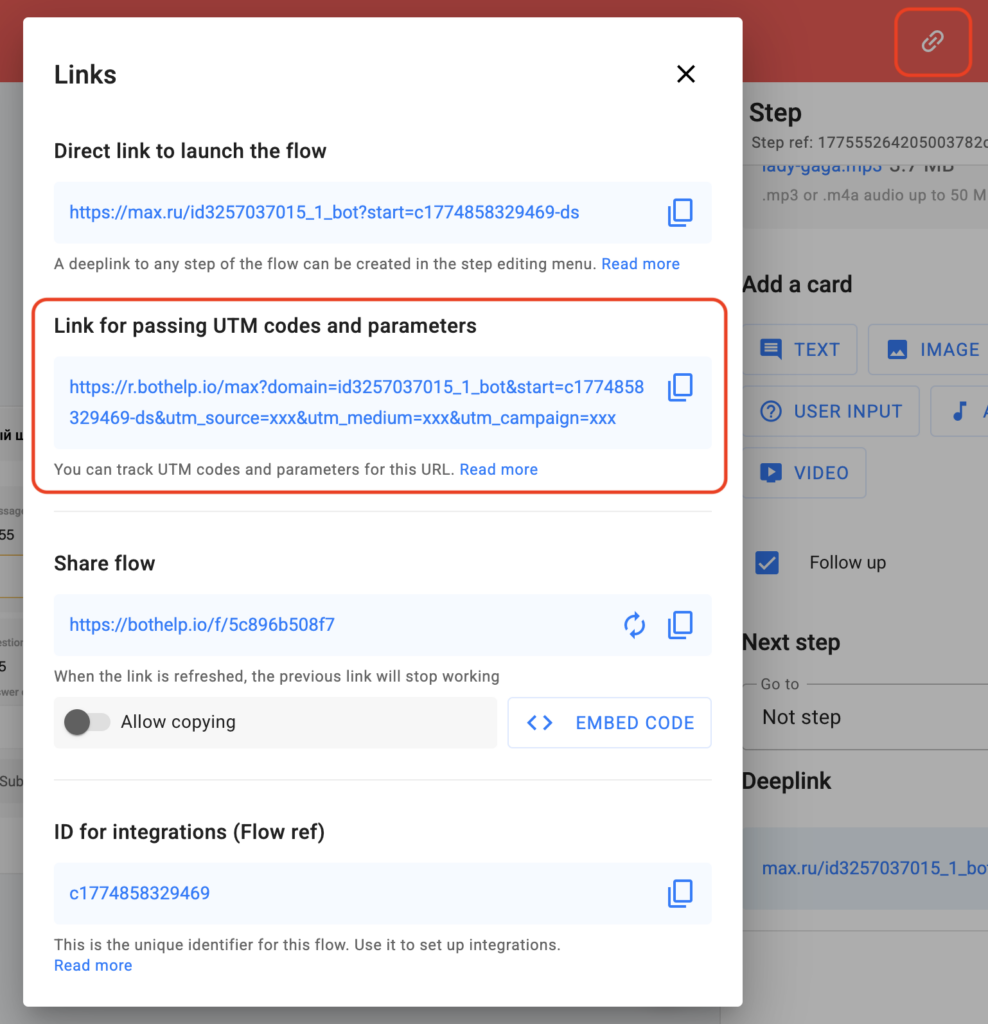
2. Copy the ready-made link for passing UTM tags and parameters, e.g., https://r.bothelp.io. The link is available for Telegram and MAX.
- In the flow builder, enable edit mode.
- Open the Links section — it is available for all messengers.
- Copy the link for passing UTM tags and parameters.
3. For BF204N or BF502N blocks:
- Paste the flow link into the “Page URL on Success” field.
For Zero Block:
- Add the link in the “Success URL” field.
If you did not find the answer to your question, feel free to contact us in the chat inside your dashboard, message us on Telegram at @BotHelpSupportBot, or email us at hello@bothelp.io.
Enjoy the full functionality of the BotHelp platform for creating broadcasts, automated funnels, and chatbots — free for 14 days.
Была ли статья полезна?
Спасибо за обратную связь!