
When you create content, spend a lot of time and resources trying to increase traffic to your flow and generate new sales, then all your efforts can be devalued if someone copies your texts and files and uses them for themselves.
To minimize these risks, there is a feature to protect content from being copied and forwarded to other chats.
To launch this feature, you have to activate the “Protect Content” checkbox in the “Text”, “Picture”, “Gallery”, “Audio” or “Video” cards of the “Message” block in the flow.
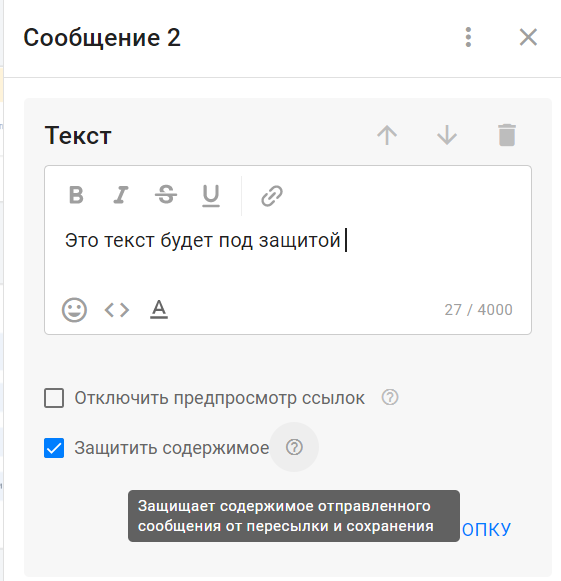
Messages and attachments marked with the “Protect Content” checkbox cannot be copied, downloaded, or shared with another contact.
Please note!
- Right now, this feature only works for Telegram multi-step flows. If the content protection feature appears in other messengers, text our support team and we will consider adding it.
- It only works for the “Text”, “Picture”, “Gallery”, “Audio” and “Video” cards in the “Message” block. We plan to add this feature for broadcasting in the future. If it is relevant to you, text our support team.
Hidden Content (Spoiler) for Images and Videos
You can send an image, gallery, or video to a subscriber under a spoiler — the content is displayed blurred and revealed when the subscriber taps it.
- The option is available for the Image, Gallery, and Video cards.
- It works in flows, auto-mailings, automated mailings, and accompanying messages in Automations. It is also available in keywords and welcome messages.
- In a gallery, there is one toggle for the entire message — all images are hidden at once.
- In Dialogs, such messages are displayed as spoilers for photos and galleries.
Details and limitations
- Telegram only. When a flow is converted to another channel, the option is cleared.
- The option is not available for File, Audio, Voice message, or Video note cards — Telegram does not support spoilers for these content types.
- In an already sent mailing, the toggle is hidden: Telegram does not allow the spoiler setting to be changed after sending.
- Photos manually sent by an operator from Dialogs cannot be sent with a spoiler.
- Videos in Dialogs do not have a preview; an icon is displayed instead.
Why use it?
A spoiler helps keep content intriguing — a price, bonus, breakdown, or lead magnet is revealed only after a tap. This small interaction can increase subscriber engagement and encourage them to take the target action inside the flow.
PS: If you haven’t created a Telegram flow yet, follow the instructions.
If you haven’t found the answer to your question, contact us in the chat in your profile or email hello@bothelp.io
Get 14 days of full functionality of BotHelp, a platform for creating broadcasting, autofunnels, and chatbots.
Sign up for BotHelp
Get 14 days of full access for free — enough to build your first bot and test it on real subscribers.
Create account
Была ли статья полезна?