
With this growth tool, you can automate the process of responding to comments under posts and Reels on your Instagram* account.
The tool will have a positive impact on the development of your project.
- It increases activity in your Instagram* account.
- The funnel will work more efficiently because you will be able to motivate users to check their Direct Messages.
- The load on moderators who used to respond to comments manually will decrease.
Setting up the growth tool
1. Go to the Growth Tools section on the BotHelp platform.
2. Click the New Tool button.
3. In the window that appears, click Reply to Comment.
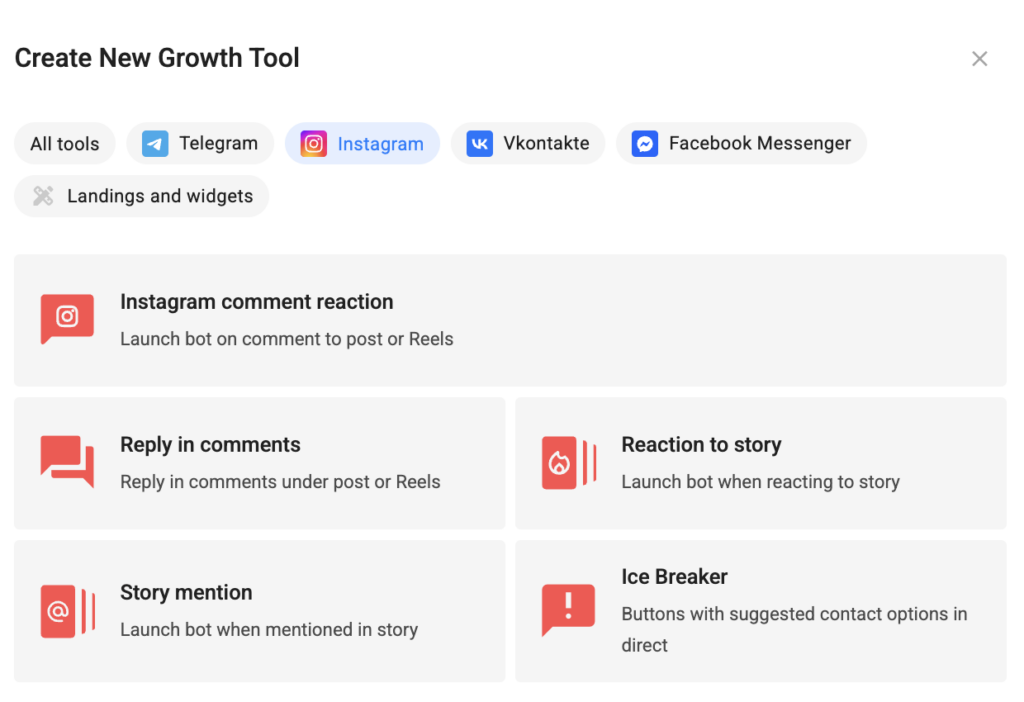
The trigger settings page will open.
4. Select the Instagram* account for which you want to enable automation.
5. In order for automation to work for a specific post/Reel, in “This Automation will work with…” select the “Certain Post or Reels” option and click the Select a post button.
Or select the “All Posts or Reels” option so that automation is triggered for all posts and Reels of the account.
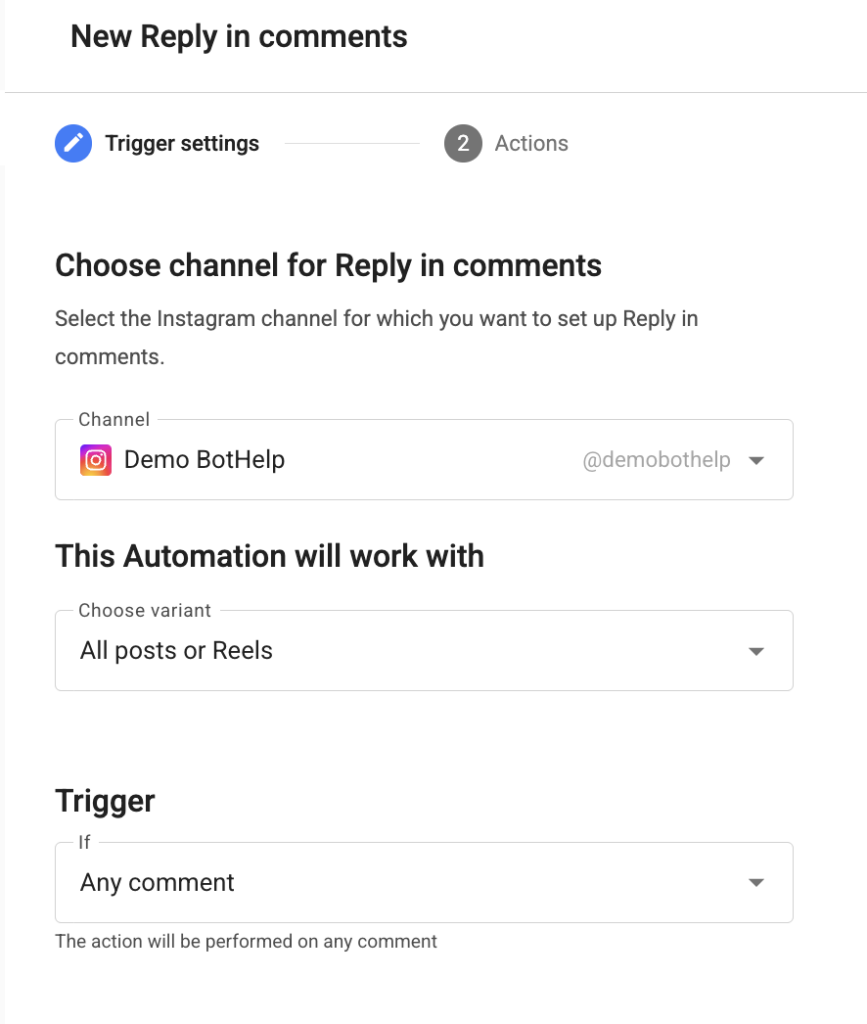
Important! Don’t forget to turn on VPN before clicking the Select Post or Reels button so that the posts load correctly.
6. In the Trigger on field, specify which comments the tool should respond to:
- Any comment — the tool responds to every comment under the selected posts or Reels. You don’t need to specify any keywords.
- Contain — the comment must contain one of the specified keywords.
- Match — the comment text must exactly match the keyword.
For Contain and Match, fill in the For comments containing these keywords field. If necessary, also fill in Exclude comments containing these keywords. A comment containing an excluded word will not receive a response, even if it also contains a keyword.
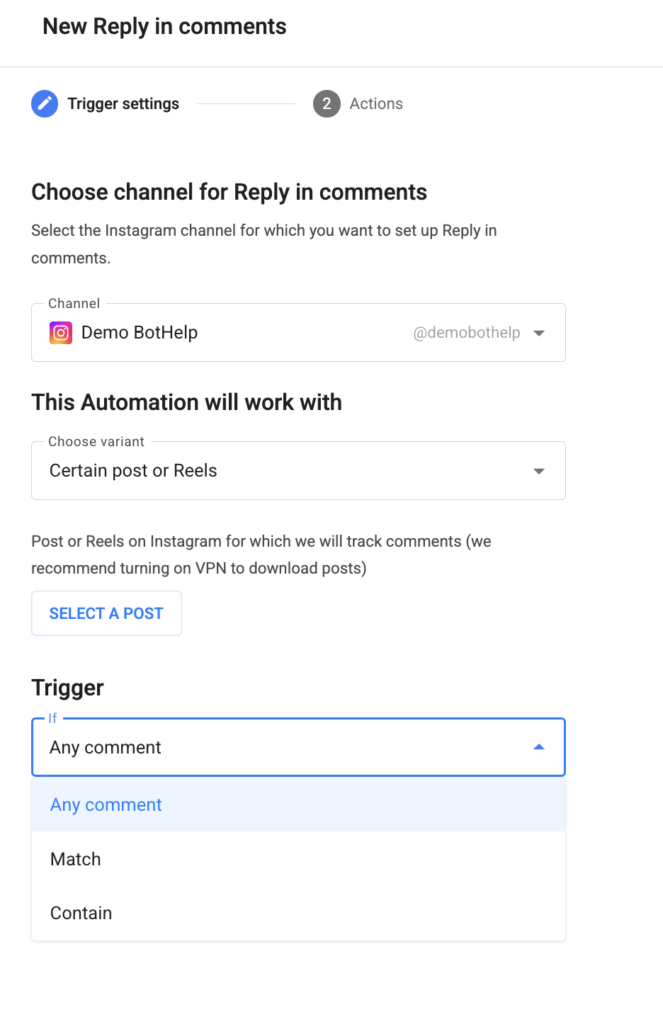
7. After filling in all the fields, click Next.
The action settings page will open.
8. Fill in up to 20 possible responses to a comment. Responses to comments will be sent in a random sequence.
Important! We recommend setting at least 5 different possible responses so that Instagram* does not ban your page.
AI-Agent Response
Select the AI-agent that will respond. The list includes all AI agents available in your account.
How the AI agent responds to comments
When a subscriber leaves a comment that matches the tool’s conditions, the AI agent posts a reply in the comment thread.
The response is generated based on three sources: the comment text, the post caption, and the selected agent’s Knowledge Base.
- Two different comments under the same post will receive different responses: the response is generated individually for each comment rather than selected from a list of predefined options.
- The agent posts exactly one response to each comment. It will not post additional replies to the same comment.
- If a subscriber leaves a new comment or replies in a thread, the tool is triggered again and generates one response for each new comment.
AI agent functions are not executed when responding to comments. Data Collection, Telegram Notifications, Google Calendar Management, Bot/Auto-mailing Launch, Image Analysis, and other functions are available only in direct messages. When responding to comments, the agent uses its Instructions and Knowledge Base.
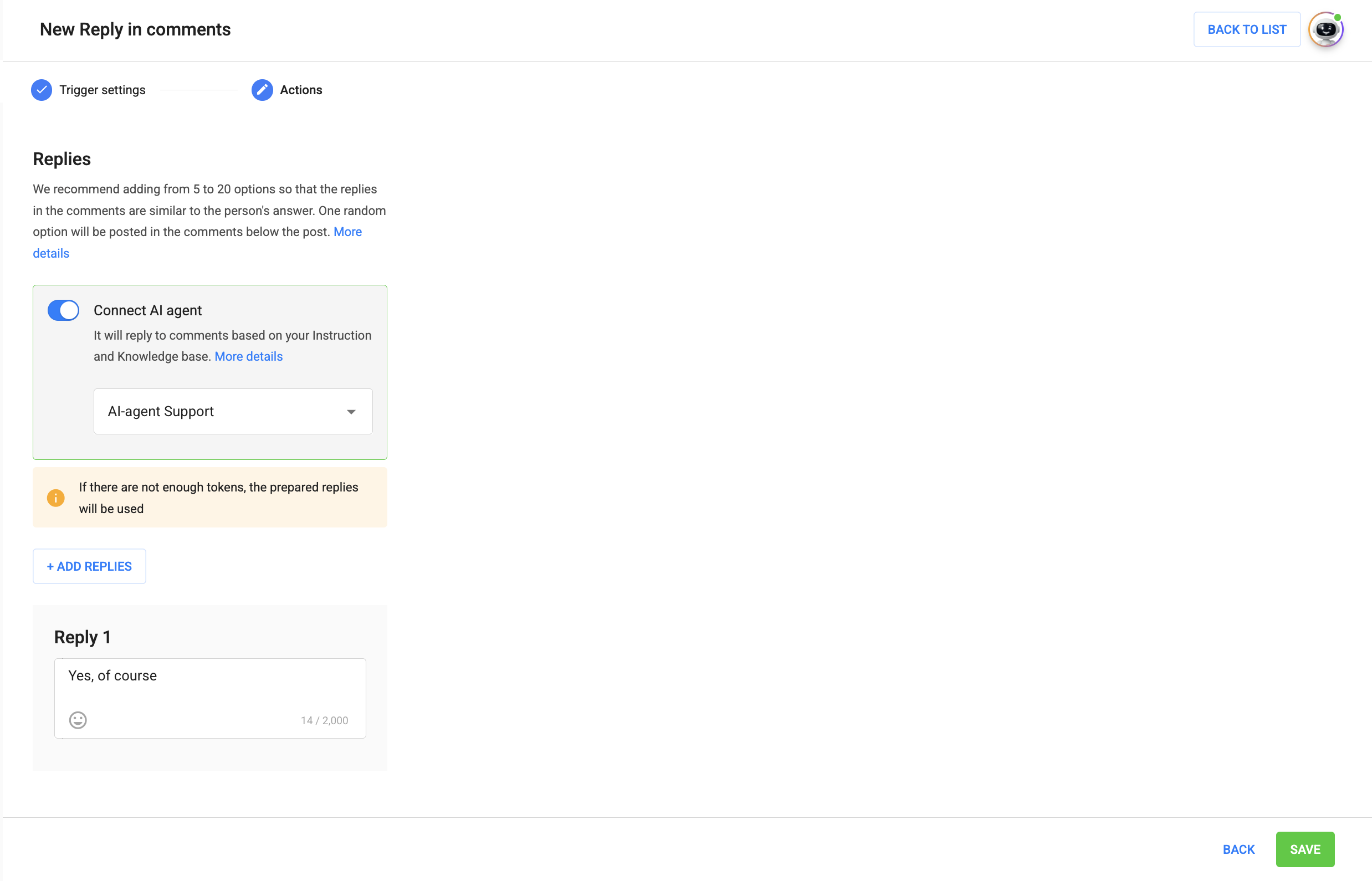
9. After you have provided responses to the comments, click Save.
Congratulations! You have successfully set up the growth tool.
We recommend checking the operation of this growth tool. To do this, leave a comment under the configured post/Reels from another Instagram* account.
The “Reply in Comment” automation does not open a conversation with the user.
This means that you will not be able to send a message to the user through the “Conversations” section in BotHelp after the automation is triggered.
To open the conversation, you can additionally set up the “Instagram Comment” automation or wait for the user to text you in Direct Messages.
The user for whom automation has been activated will be added to the BotHelp profile people base.
This means that it will be taken into account when calculating the number of chargeable people in the profile.
Also in the “Conversations” section, in a conversation with such a person, you will see that this automation has worked for them.
* Owned by Meta, an organization recognized as extremist and banned in Russia.
If you haven’t found the answer to your question, contact us in the chat in your profile or email hello@bothelp.io
Get 14 days of full functionality of BotHelp, a platform for creating broadcasting, autofunnels, and chatbots.
Sign up for BotHelp
Get 14 days of full access for free — enough to build your first bot and test it on real subscribers.
Create account
Была ли статья полезна?