
Send Attachment is an AI-agent function that sends pre-prepared images, videos, and files to a subscriber at the right point in the conversation. The function allows you to automatically deliver lead magnets and bonus materials and convert more subscribers into the desired action.
Function capabilities
- Send images, videos, and files that you have previously added to the function.
- Add up to 10 attachments for a single trigger condition.
- Describe the trigger condition (when the attachments should be sent) in natural language from 30 to 2000 characters.
- Upload images directly to the function. Files and videos can be selected from Storage or uploaded as new files.
- Uploaded files are automatically added to BotHelp File Storage, while videos are added to the Video Storage. You can reuse them in other AI agents and broadcasts.
- Whether the agent adds accompanying text to the attachment depends on your instructions.
- The function is already included in ready-made AI-agent templates.
Supported formats
- Images: PNG, JPG, JPEG
- Videos: MOV, MP4
- Files and audio: PDF, CSV, XLSX, MP3, OGG, M4A, MD
How to enable the function
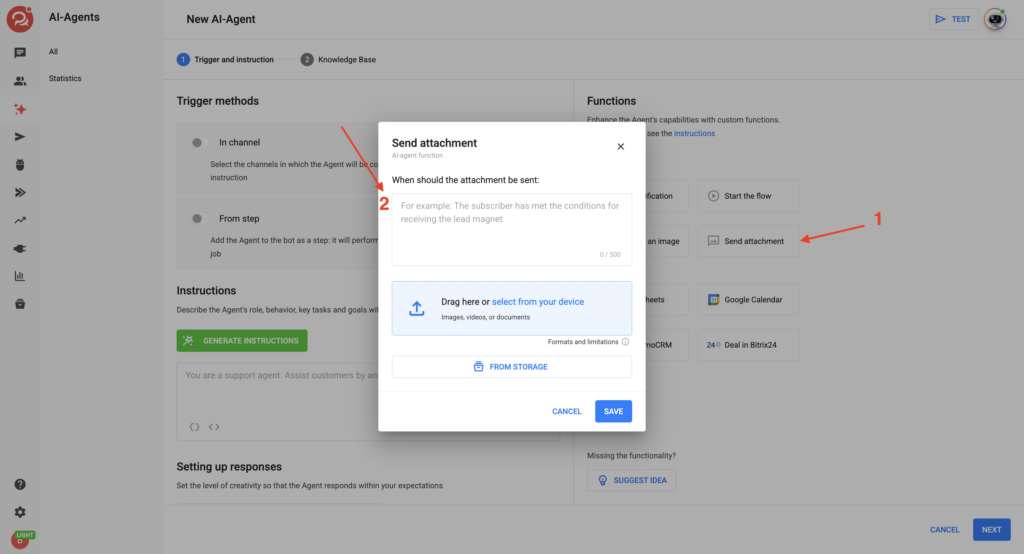
- In the AI-agent settings, open the Functions section and select the Send Attachment card.
- Describe the trigger condition — when the agent should send the attachments.
- Add attachments: upload an image or select a file or video from Storage, or upload new ones. You can add up to 10 attachments.
- Save the AI agent and test the attachment delivery.
Use cases
- 🎁 Delivering a lead magnet: the agent sends a checklist or PDF guide after a subscriber provides their contact details.
- 🎬 Sending a product video or tutorial: the agent sends a product review or instruction when requested by the subscriber.
- 🛒 Sending a price list or catalog: the agent sends an XLSX file when a customer asks about available products.
- 🎧 Sharing a webinar or podcast recording: the agent sends an MP3 recording to help warm up the subscriber.
- 📸 Showing examples of work: the agent sends images of completed projects, certificates, or diplomas.
How the function works
Managing attachments in Storage
Files and videos uploaded through the function are automatically added to BotHelp Storage. You can reuse them in other AI agents and flows, as well as download or delete them.
Accompanying message
Whether the agent sends the attachment with a message such as “Here’s your guide” or “I’ve sent the catalog”, or sends the file without any text, depends on your instructions.
Describe the desired behavior in the trigger condition.
Delivery errors
The function works across all messengers supported by the platform.
However, messengers have different restrictions on attachment sizes and file types. If a file does not meet the requirements of a particular messenger, it will not be delivered to the subscriber in that channel, even if it can be sent successfully in other channels.
We recommend testing attachment delivery in all messengers where your AI agent is active to make sure that the attachments are delivered successfully.
Important: Videos cannot be sent in VK. Files and audio are sent as links to Storage. Images are sent directly to the chat.
If you couldn’t find the answer to your question, contact us via the in-app chat, send us a message on Telegram at BotHelpSupportBot, or email us at hello@bothelp.io.
Get 14 days of full access to the BotHelp platform for creating broadcasts, automated funnels, and flows.
Sign up for BotHelp
Get 14 days of full access for free — enough to build your first bot and test it on real subscribers.
Create account
Была ли статья полезна?