
Facebook comment reaction is a Growth Tool that automatically sends a private message in Messenger to anyone who leaves a comment on your Facebook* Page post. It helps convert engaged commenters into subscribers and immediately start the required flow without having to reply to every comment manually.
Capabilities
- Trigger on comments to a specific post or to all posts on the selected Facebook* Page, including posts that will be published in the future.
- Select a post from the Published or Scheduled tabs.
- Select a trigger condition: Any comment, Contain, or Match. With Any comment, you don’t need to specify keywords — the tool responds to all comments under the selected posts.
- Add excluded words for the Contain and Match conditions. A comment containing an excluded word will not pass the filter, even if it also contains a keyword.
- Send the first message as text (optionally with a button) or an image.
- Anyone who receives the private message is automatically added as a subscriber to your account.
- Run additional actions when the tool is triggered.
How to set it up
- Go to Growth Tools and click New Tool.
- Under the Facebook* section, select Facebook comment reaction.
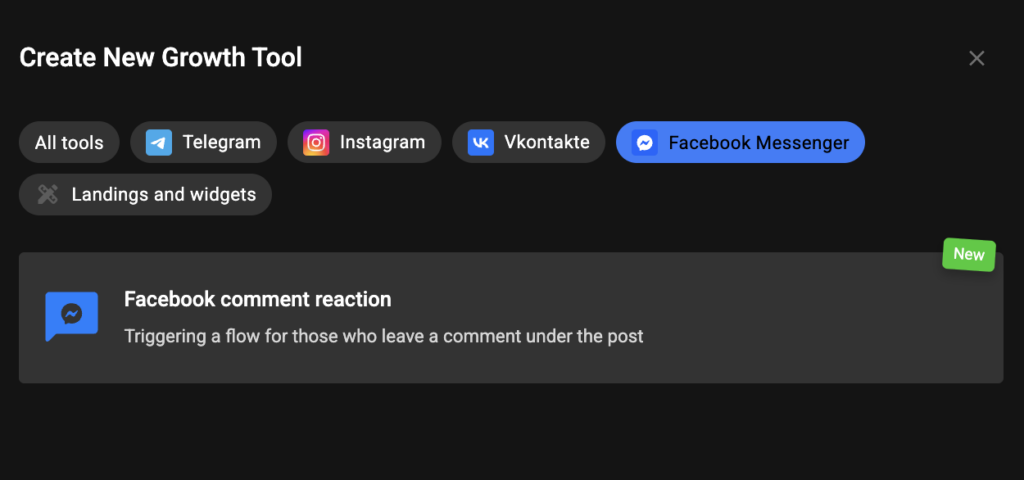
- Choose the Facebook* Page whose comments you want to monitor.
- Select the trigger scope:
- All Posts, or
- a Certain Post. If you choose a specific post, a selection window with the Published and Scheduled tabs will open.
- Specify the trigger condition:
- Any comment — the tool triggers for every comment under the selected posts. You don’t need to specify any keywords.
- Contain — the comment must contain one of the specified keywords.
- Match — the comment text must exactly match the specified keyword.
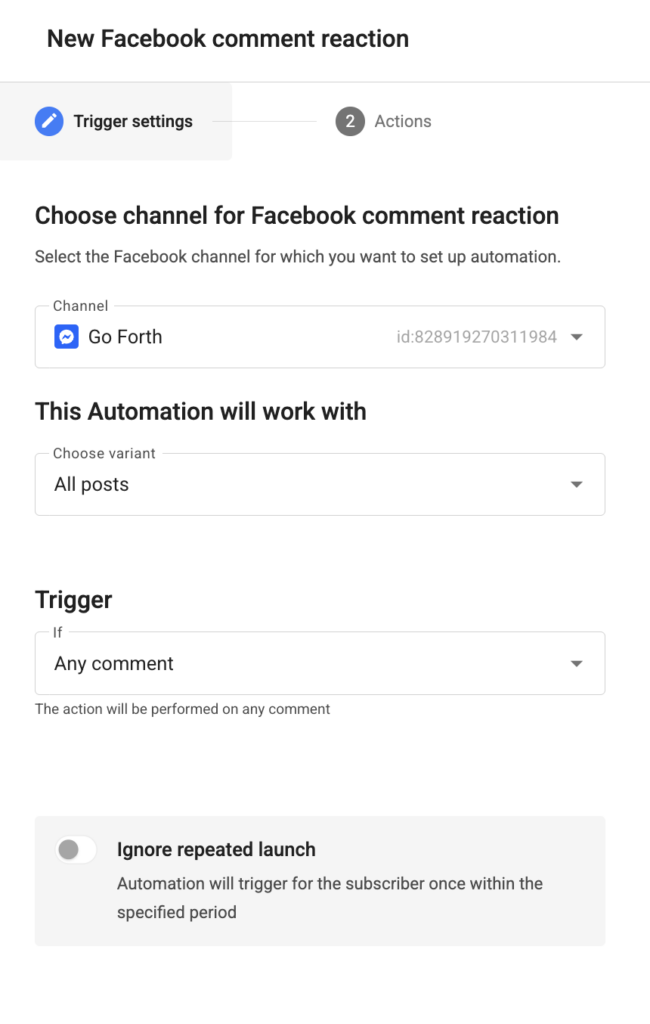
For Contain and Match, specify the keywords and, if necessary, add excluded words.
Important: When Any comment is selected, the keyword and excluded word fields become unavailable. No filtering is applied, and a private message is sent for every comment.
We recommend: If you want the tool to respond to all comments, select Any comment. This way, you don’t need to choose keywords or come up with exclusion words to make sure no comment is missed.
- Create the first message. It can be:
- text (optionally with a button), or
- an image.
Keep an eye on the character counter while composing your message.
- Add any additional actions if needed.
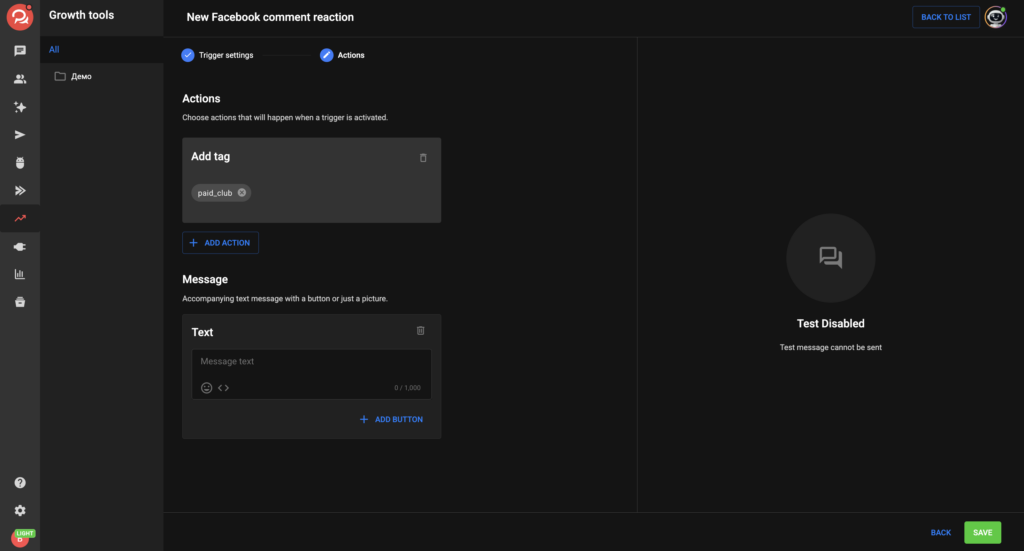
- Save the tool and test it by leaving a comment containing one of your keywords.
Use cases
🎓 Online School
Ask users to comment “I’M IN” under a webinar announcement. Everyone who comments receives a Messenger message with the registration link.
🛒 Online Store
Under a product post, users comment “price”, and the flow automatically sends the price list along with a button linking to the order page.
📣 Giveaway
A comment containing a specific keyword triggers a Messenger message with the giveaway rules and automatically adds the user as a subscriber.
🧠 Expert Blog
When someone comments “guide”, the flow sends a lead magnet and continues the conversation after the user replies.
🔁 Evergreen Funnel
Enable the All Posts option so the rule automatically applies to all future posts published on your Facebook* Page.
How it works
Subscribers and Flow Continuation
As soon as the private message is sent, the commenter is added as a subscriber to your account. They remain a subscriber even if they never reply.
The flow continues only after the user replies in Messenger, within Messenger’s 24-hour messaging window.
* Facebook is a Meta product. Meta is designated as an extremist organization and is prohibited in Russia.
If you couldn’t find the answer to your question, contact us via the in-app chat, send us a message on Telegram at BotHelpSupportBot, or email us at hello@bothelp.io.
Start your 14-day free trial and get full access to the platform for creating broadcasts, automated funnels, AI agents, and flows.
Sign up for BotHelp
Get 14 days of full access for free — enough to build your first bot and test it on real subscribers.
Create account
Была ли статья полезна?