
The functions in this group work with dates: they add days and months, calculate differences, convert a date to the right format and write it out in Russian.
Where it helps:
- calculate the subscriber’s age or the time since a purchase;
- get the date in N days — for example, the end of a trial period;
- show a date in words, for example “3 апреля 2026, пятница”.
Functions
| Function | Description | Example |
|---|---|---|
| get_current_time() | Returns the current date and time in the cabinet’s time zone. Format: %Y-%m-%d %H:%M:%S. | globals.now = get_current_time() → "2025-11-11 16:30:00" |
| addYear(date, years) | Adds or subtracts years (taking leap years into account). Use a negative number to subtract. | addYear("2020-01-01", 3) → "2023-01-01" |
| addMonth(date, months) | Adds or subtracts months (takes month lengths and leap years into account). | addMonth("2025-01-10", 2) → "2025-03-10" |
| addDays(date, days) | Adds or subtracts days. Use a negative number to subtract. | addDays("20.08.2019", -99) → "13.05.2019" |
| addHours(date, hours) | Adds or subtracts hours. Use a negative number to subtract. | addHours("2026-04-03 10:00:00", 3) → "2026-04-03 13:00:00" |
| addMinutes(date, minutes) | Adds or subtracts minutes (for "Date and Time" values). | addMinutes(get_current_time(), 20) → "2025-11-11 16:50:00" |
| addWeeks(date, weeks) | Adds or subtracts weeks. Use a negative number to subtract. | addWeeks("2026-04-03", 1) → "2026-04-10" |
| format_date(date, "формат") | Converts a date to the specified format. Supported formats: %Y-%m-%d, %d.%m.%Y, %Y-%m-%d %H:%M:%S, %d.%m.%Y %H:%M:%S. | format_date("2025-10-10", "%d.%m.%Y") → "10.10.2025" |
| convert_datetime(date, input_format, output_format) | Converts a date from one format to another. Formats use codes: %Y — year, %m — month, %d — day, %H — hours, %M — minutes, %S — seconds. | convert_datetime("2011/11/03", "%Y/%m/%d", "%d.%m.%Y") → "03.11.2011" |
| date_diff(date1, date2, unit) | Returns the difference between two dates. The unit parameter can be "days" or "minutes". | date_diff(client.birth_date, get_current_time(), "days") → 9125 |
| date_rus(date, with_year) | Returns the date written in Russian: day and month. To add the year, pass True as the second argument. If no date is given, uses the current date in the account time zone. | date_rus("2026-04-03") → "3 апреля" date_rus("2026-04-03", True) → "3 апреля 2026" |
| weekday(date) | Returns the day of the week as a number from 1 to 7: Monday is 1, Sunday is 7. If no date is given, uses the current date in the account time zone. | weekday("2026-04-03") → 5 |
| weekday_name(date) | Returns the name of the day of the week in Russian, in lowercase. If no date is given, uses the current date in the account time zone. | weekday_name("2026-04-03") → "пятница" |
| timestamp(date) | Returns Unix time: the number of seconds since January 1, 1970 (UTC). The date is read in the account time zone. If no date is given, uses the current time. | timestamp("2026-01-01 03:00:00") → 1767225600 (for an account in Moscow time) |
Good to know
- Variables of the “Date” and “Date and time” types are stored in the internal format
YYYY-MM-DD. For example, the input11.11.2011is stored as"2011-11-11". - All operations are performed in the account time zone.
- Multiplying or dividing dates causes a “Type error”.
- In
date_diff, date1 is subtracted from date2.
Example: age and forecast
Let’s calculate the subscriber’s age and make a forecast based on it. First, ask for the birth date and save the answer to the birth_date variable of the “Date” type.
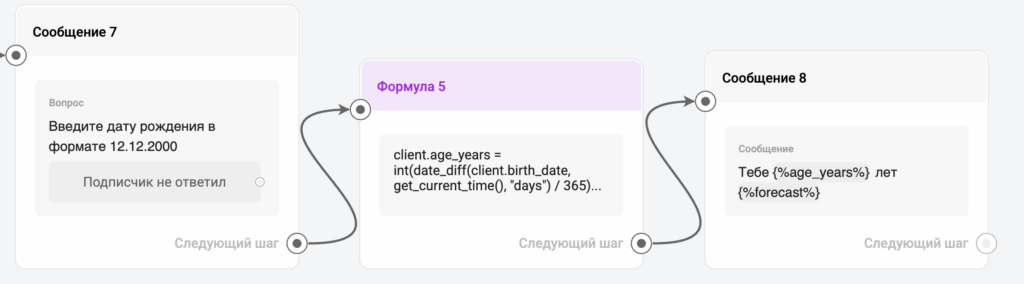
Then in the “Formula” step:
- Use date_diff to calculate the difference in days between birth_date and the current date get_current_time.
- Use int to drop the fractional part and get the full number of years.
- Use if to save the answer to the forecast variable.
client.age_years = int(date_diff(client.birth_date, get_current_time(), "days") / 365)
client.forecast = if(client.age_years >= 30, "Now is the time for consistency and stability 👌", "A period of experiments and growth, try something new 💫")
And show the answer to the subscriber in the flow:
You are {%age_years%} years old {%forecast%}
Example: a date in words
client.today_text = date_rus(get_current_time(), True) + ", " + weekday_name(get_current_time())
today_text gets, for example, 3 апреля 2026, пятница. date_rus and weekday_name return Russian text.
Example: the end of a trial period
client.trial_end = addDays(get_current_time(), 14)
client.trial_end_text = format_date(client.trial_end, "%d.%m.%Y")
If today is April 3, 2026, trial_end_text gets 17.04.2026.
Business hours, the nearest event dates and birthdays are described in Formula: Schedules and Reminders. A ready-made template for parsing a birth date is in Formula: Ready-Made Templates.
If you did not find the answer to your question, feel free to contact us in the chat inside your dashboard, message us on Telegram at @BotHelpSupportBot, or email us at hello@bothelp.io.
Enjoy the full functionality of the BotHelp platform for creating broadcasts, automated funnels, and chatbots — free for 14 days.
Sign up for BotHelp
Get 14 days of full access for free — enough to build your first bot and test it on real subscribers.
Create account
Была ли статья полезна?

