
The functions in this group help you calculate right inside a flow — discounts, order totals, quiz points — and show the result to the subscriber in a neat format.
Where it helps:
- calculate a discount and the order total;
- round the result and show a price with thousands separators;
- convert a subscriber’s answer from text to a number to compare and calculate.
Arithmetic operations are supported: +, -, *, /.
Functions
| Function | Description | Example |
|---|---|---|
| round(x) | Rounds a number to the nearest integer (0.5 rounds up). When using a numeric field, the function round round({%numeric_field%}, 3) rounds only to 3 decimal places (thousandths). For example, the number 2.123456789 becomes 2.123 after rounding. | round(2.5) → 3 |
| int(x) | Converts a value to an integer. | int("42") → 42 |
| float(x) | Converts a string to a floating-point number. | float("12.34") → 12.34 |
| str(x) | Converts a value to a text string. | str(100) → "100" |
| abs(x) | Returns the absolute value of a number (without the minus sign). | abs(-5) → 5 |
| min(a, b, …) | Returns the smallest of the numbers. | min(3, 7, 1) → 1 |
| max(a, b, …) | Returns the largest of the numbers. | max(3, 7, 1) → 7 |
| pow(x, y) | Raises x to the power of y. | pow(2, 3) → 8 |
| floor(x) | Rounds a number down to an integer. | floor(4.7) → 4 |
| ceil(x) | Rounds a number up to an integer. | ceil(4.2) → 5 |
| sqrt(x) | Returns the square root. If the result is a whole number, returns an integer. | sqrt(16) → 4 |
| fac(n) | Returns the factorial of a number. The maximum argument is 170. | fac(5) → 120 |
| log(x, base) | Returns the logarithm of x to the given base. If the base isn't set, returns the natural logarithm. | log(100, 10) → 2.0 |
| exp(x) | Returns e raised to the power of x. | exp(1) → 2.718281828459045 |
| sin(x), cos(x), tan(x) | Trigonometric functions. The angle is set in radians. | sin(0) → 0.0 |
| format_number(number, decimals, thousands_sep, decimal_sep) | Formats a number: rounds it to the given number of decimal places and separates thousands. By default, the thousands separator is a space and the decimal separator is a comma. Handy for prices. | format_number(1234567.891, 2) → "1 234 567,89" |
Example: calculations with variables
Variables must be created in advance. Add a “Formula” step and write the code:
"""Calculate variable values"""
client.A = 2 - 4      # Data type "Number", negative
client.B = 1.275 + 5  # Data type "Number", decimal
client.C = 5 * 10 / 2 # Data type "Number", integer
client.D = "10"       # Data type "String"
client.E = "10.5"     # Data type "String"

"""Working with local variables"""
local1 = 2 # Assign a local variable
local2 = 3
# Add the local variables into a user variable
client.F = local1 + local2

"""Apply mathematical functions"""
client.discount = round(client.B)     # Round to the nearest integer
client.sum_orders = int(client.D)     # Convert a string to a number
client.life_number = float(client.E)  # Convert a string to a decimal number
client.forecast = str(client.C)       # Convert a number to a string
In the “Message” step, show the text to the subscriber
— Calculate variable values
A = {%A%}
B = {%B%}
C = {%C%}
D = {%D%}
E = {%E%}
— Working with local variables
F = {%F%}
— Apply mathematical functions
discount = {%discount%}
sum_orders = {%sum_orders%}
life_number = {%life_number%}
forecast = {%forecast%}
Case: the flow calculates from the subscriber’s number
The subscriber sends their lucky number, the flow calculates and sends back the result.
- In the flow builder, add a “Message” step and select the “Question” block inside it. Enter your question.
- Save the answer to a field. You can create a field in “Settings” — “Custom fields”. For example, create the fields “Number” and “Result”, both of the number type.
- Add a “Formula” step and write client.Result = client.Number * 2.
- Add a “Message” step and insert the macro of the “Result” field.
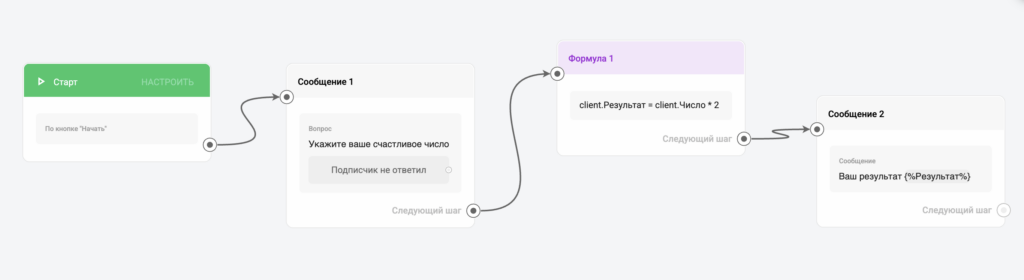

You can build any calculation the same way.
Example: show an amount nicely
Calculate the order total and show it with thousands separators.
client.total = client.price * client.qty
client.total_text = format_number(client.total, 2) + " $"
If price = 4115 and qty = 3, total_text gets 12 345,00 $. To use a dot and a comma like in English, pass the separators: format_number(client.total, 2, ",", ".") gives 12,345.00.
Random numbers and distances between coordinates are described in Formula: Games and Giveaways.
If you did not find the answer to your question, feel free to contact us in the chat inside your dashboard, message us on Telegram at @BotHelpSupportBot, or email us at hello@bothelp.io.
Enjoy the full functionality of the BotHelp platform for creating broadcasts, automated funnels, and chatbots — free for 14 days.
Sign up for BotHelp
Get 14 days of full access for free — enough to build your first bot and test it on real subscribers.
Create account
Была ли статья полезна?

