
The functions in this group work with text: they cut, split, join and change letter case.
Where it helps:
- address the subscriber by name with a capital letter;
- split a full name or an address into parts;
- build a message from several fields;
- check the length of an answer.
Functions
| Function | Description | Example |
|---|---|---|
| len(text) | Returns the number of characters in a string. | len("Привет") → 6 |
| substring(str, n1, n2) | Cuts the string: n1 — how many characters to skip from the left; n2 — a negative number, how many characters to cut from the right. n2 is optional. | substring("BotHelp", 3) → "Help" substring("BotHelp", 3, -2) → "He" |
| upper(text) | Converts text to uppercase. | upper("привет") → "ПРИВЕТ" |
| lower(text) | Converts text to lowercase. | lower("HELLO") → "hello" |
| split(text, separator, index) | Splits the string by a separator and returns the part with the given number (starting from 0). If the number isn't set, returns the first part. If there's no such part, returns an empty string. | split("John Smith", " ") → "John" split("John Smith", " ", 1) → "Smith" |
| match(text, pattern, ignore_case=True) | Checks if the string contains the specified word (by pattern). | match("купить товар", "купить") → True |
| split_list(text, separator, max_parts) | Splits the string by a separator and returns all parts as a list. max_parts limits the number of parts (optional). | split_list("course, book", ", ") → ["course", "book"] |
| strip(text) | Removes spaces at the start and end of a string. | strip(" hello ") → "hello" |
| capitalize(text) | Makes the first letter of the string uppercase and the rest lowercase. | capitalize("jOHN") → "John" |
| title(text) | Makes the first letter of each word uppercase and the rest lowercase. | title("john smith") → "John Smith" |
| contains(text, pattern, ignore_case) | Checks whether the string contains the pattern. Case-sensitive by default; pass True as the third argument to ignore case. | contains("I want the course", "course") → True |
| startswith(text, prefix) | Checks whether the string starts with the given text. | startswith("+79001234567", "+7") → True |
| endswith(text, suffix) | Checks whether the string ends with the given text. | endswith("mail@gmail.com", "gmail.com") → True |
| replace(text, old, new, count) | Replaces part of the string with another. By default replaces all matches; count limits the number of replacements (optional). | replace("8-900-123", "-", "") → "8900123" |
| normalize_phone(phone) | Leaves only digits in a phone number. An 11-digit number starting with 8 is converted to start with 7. | normalize_phone("8 (978) 999-99-99") → "79789999999" |
| tg_escape(text) | Adds a backslash before Telegram formatting characters (_ * [ ] ( ) ~ ` > # + - = | { } . !) so the text is shown as is. | tg_escape("1.5*2") → "1\.5\*2" |
| findall(pattern, text, index) | Finds all parts of the text that match a regular expression and returns them as a list. With index, returns one match by number (starting from 0), or an empty string if there's none. | findall("\d+", "Order 123 and 456") → ["123", "456"] findall("\d+", "Order 123 and 456", 1) → "456" |
| similar(text1, text2, threshold) | Compares strings allowing for typos, ignoring case and spaces at the edges. Returns True if the similarity is at least threshold: from 0 to 1, 0.7 by default. | similar("Moscow", "Moskow") → True |
Dates in string functions
Variables of the “Date” and “Date and time” types are stored in the internal format YYYY-MM-DD. For example, the input 11.11.2011 is stored as "2011-11-11". That’s why substring() cuts a date according to this format.
To get the expected values:
Option 1: convert the date to the familiar format
date = format_date(client.birth_date, "%d.%m.%Y")
Option 2: cut the date taking the YYYY-MM-DD format into account
Use the positions in the string "2011-11-11".
Example: check the answer length
Count the characters in the answer with len. Variables with the required names must be created in advance.
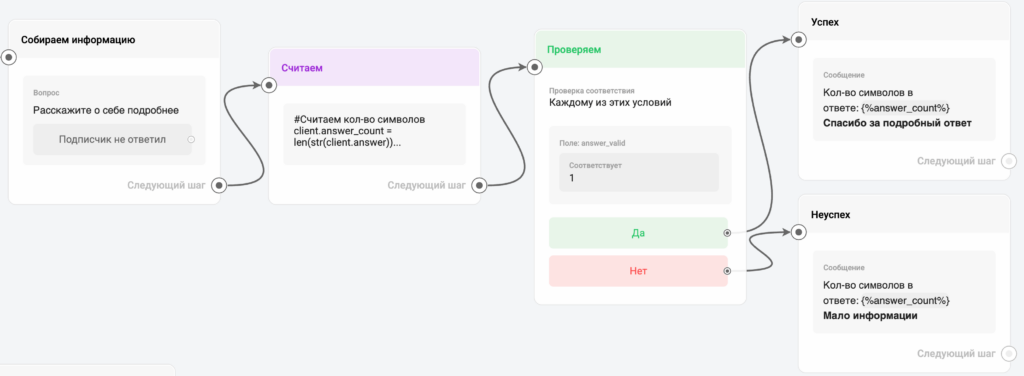
# Count the characters
client.answer_count = len(client.answer)

# Check that there are 10 or more characters: if yes, answer_valid gets 1, if not — 0
client.answer_valid = len(client.answer) >= 10
Example: a name with a capital letter
The subscriber wrote ” john smith”. Take the first word and bring it to a proper form.
client.first_name = title(split(strip(client.full_name), " "))
first_name gets John.
Example: life number
Let’s calculate the life number — the sum of all digits of the birth date. The subscriber’s date is passed in the birth_date variable.
- In line 1, convert the date to
DD.MM.YYYY, because inside BotHelp the date is stored as"2011-11-11". - In lines 3 to 10, use substring to take each digit and save it to a local variable.
- In line 12, add the digits up into life_number to show the subscriber.
date = format_date(client.birth_date, "%d.%m.%Y")

d1 = int(substring(date, 0, -9))
d2 = int(substring(date, 1, -8))
d3 = int(substring(date, 3, -6))
d4 = int(substring(date, 4, -5))
d5 = int(substring(date, 6, -3))
d6 = int(substring(date, 7, -2))
d7 = int(substring(date, 8, -1))
d8 = int(substring(date, 9, 0))

client.life_number = d1+d2+d3+d4+d5+d6+d7+d8
Line break (\n)
The \n character adds a line break inside text.
client.text = "First line\nSecond line"
Result:
First lineSecond line
Joining strings
1. Joining with the + operator
Combines several values into one string and saves the result to a variable. Use it to build a final message, an ID or a signature.
- Only strings can be joined with
+. Convert values of other types to a string first:str(client.A). - Join the values with
+. - Assign the result to a variable.
client.result = "Order #" + client.order_id + " accepted"
What client.result contains: Order #12345 accepted
Important: the + operator creates a new value. If the code runs again, the previous value is overwritten.
2. Adding text with the += operator
Gradually appends text to the end of a string without erasing the previous value. Use it for logs, message history and collecting comments.
client.log = "First message"
client.log += "\nSecond message"
client.log += "\nThird message"
What client.log contains:
First messageSecond messageThird message
Important: the += operator doesn’t replace the value, it adds the new one to the end of the string. Use \n to separate lines.
For example, let’s collect the history of the subscriber’s inputs in one variable and add the time to each entry:
- Save the current time to a local variable with
get_current_time(). - Join the order number, a line break and the time. Only strings can be joined — convert other types with
str(). - Append the entry to the end of the log with
+=, separating entries with an empty line.
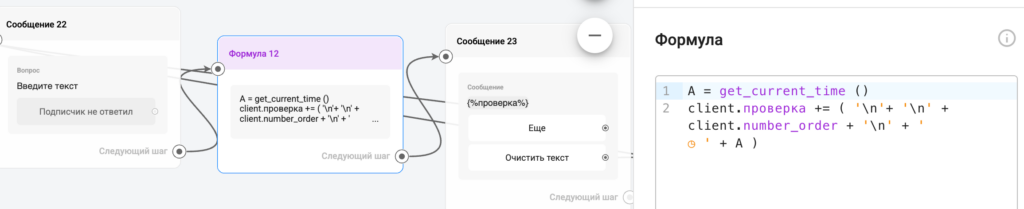
A = get_current_time()
client.check += ('\n' + '\n' + client.number_order + '\n' + ' ◷ ' + A)
To bring a phone number to one format, accept an answer with a typo or find a fragment by a pattern, see Formula: Checking Subscriber Answers.
If you did not find the answer to your question, feel free to contact us in the chat inside your dashboard, message us on Telegram at @BotHelpSupportBot, or email us at hello@bothelp.io.
Enjoy the full functionality of the BotHelp platform for creating broadcasts, automated funnels, and chatbots — free for 14 days.
Sign up for BotHelp
Get 14 days of full access for free — enough to build your first bot and test it on real subscribers.
Create account
Была ли статья полезна?

