
Common mistakes when setting up broadcasts and sequences
❌ Wrong subscriber segmentation
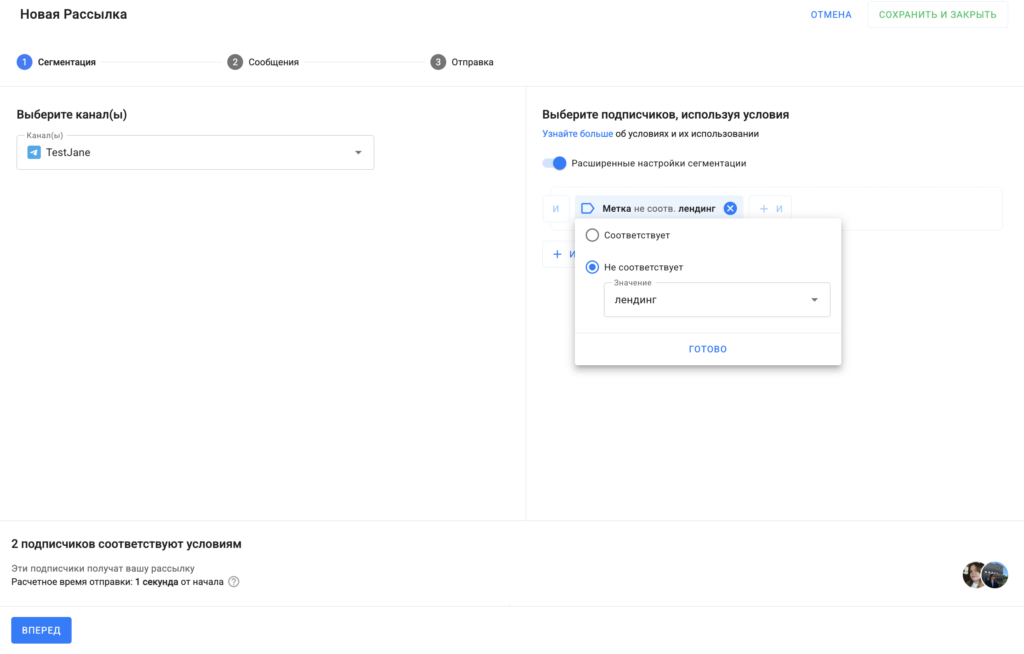
If a broadcast is sent not to all subscribers, the reason is often filters and tags.
What happens:
-
too many conditions are set in the advanced segmentation settings;
-
you may have added an extra tag;
-
the subscriber base for the broadcast gets narrowed down too much;
-
some people simply don’t fall into the selected segment.
✅ Carefully check all filters and tags before sending a broadcast in the advanced segmentation settings.
-
Use only the conditions you need to reach the right audience.
-
If the base is small, try removing extra filters or tags and sending again.
❌ Sending to disconnected channels
If you selected a channel for the broadcast but it isn’t connected or is unavailable, messages won’t be sent through that channel.
✅ Before sending, make sure the channel is connected to the account and working.
❌ The broadcast is in Drafts
If you saved the broadcast as a draft, it won’t be sent.
✅ Make sure the broadcast is in the Scheduled tab.
❌ The sequence doesn’t start
- ✅ Sequences don’t start on their own — you need to set up a launch through a landing page, a welcome message, a keyword, or add users manually.
- ✅ Check that the sequence is activated.
❌ Channel limitations
Some messengers (for example, WhatsApp*) have extra requirements — templates only and paid sending.
Why a broadcast is slow
Broadcasts can be slow, and sometimes this is normal.
1. Messenger limits
Sending speed depends on the messenger and the message type (text, text + image, etc.). Each messenger’s API limits the number of messages sent per minute per subscriber and per group. Learn more about limits in the article.
2. A large subscriber base
Sending a broadcast to a large subscriber base may take more time. For example, a broadcast to 5,000 subscribers goes out faster than a broadcast to 50,000 subscribers.
The broadcast wasn’t sent
1. No connection to the channel
If the channel is disconnected or has lost connection, the broadcast won’t be sent — reconnect the channel first.
2. The broadcast is in drafts
If you saved the broadcast as a draft, it won’t go out.
3. Scheduling errors
Check the time zone in your account: all scheduled broadcasts are sent according to it.
4. No active subscribers
If no subscriber matches the selected segmentation conditions, nothing will be sent.
5. Broadcast settings
Make sure all fields in the broadcast are filled in (for example, the text) and attached files meet the platform requirements.
6. Flow permissions
Check that the bot has all access rights and permissions in the channel. For example, for a VKontakte broadcast, set up the bot according to the instructions.
The broadcast was sent partially
1. Wrong segmentation
Some subscribers may not match the conditions (tags, fields, filters).
2. Subscribers unsubscribed
The subscriber base is updated when the broadcast is sent. People may have unsubscribed from the bot, and then the broadcast won’t reach them. For example, you see 10,000 subscribers, but the broadcast went to only 9,900 because 100 people had already unsubscribed or blocked the bot.
3. Messenger limitations
Not all subscribers can receive messages: for example, Telegram restricts bot messages in some cases.
4. Slowdown / sending queue
If the base is very large, the broadcast may not have reached some people yet — it’s still being sent.
If your case isn’t described in this article, you may have run into a non-standard situation. In this case, contact support.
* Belong to Meta, which is recognized as an extremist organization and banned in Russia.
If you did not find the answer to your question, feel free to contact us in the chat inside your dashboard, message us on Telegram at BotHelpSupportBot or email us at hello@bothelp.io
Enjoy the full functionality of the BotHelp platform for creating broadcasts, automated funnels, and chatbots — free for 14 days.
Sign up for BotHelp
Get 14 days of full access for free — enough to build your first bot and test it on real subscribers.
Create account
Была ли статья полезна?

