
On the BotHelp platform, in the People section, you can use the «Bulk actions button to add subscribers to a flow or remove them from it, subscribe them to a sequence or unsubscribe them from it, add or delete a tag, and delete subscribers in bulk.
Add to flow
In the People section, you can start a flow from any step for a group of subscribers.
- Go to the People.
- Select subscribers of one channel. To do this, you can filter subscribers by the required channel.
At once, you can select all subscribers of the channel with the «Select all option or up to 100 subscribers on one page. - Click the Bulk actions.
- Select Add to flow.
- Select the flow and the step it will start from.
- Adding the selected subscribers to the flow at the specified step will start. This may take some time. New bulk actions, except adding and deleting tags, won’t be available until the bulk action already running is finished.
Important! The bulk action is available only if subscribers of one channel are selected. The flow won’t start for subscribers who blocked the channel or whose 24-hour messaging window has ended (for Instagram*).
The bulk action is available to agents with the Administrator or Editor role.
If the subscriber was going through another flow of the channel during the transfer, the flow they were moved to will start and run in parallel. If the subscriber is already in the specified flow, they will move to the specified step.
Remove from flow
To stop a flow for the selected subscribers, use the bulk action Remove from flow.
- Go to the People.
- Select subscribers of one channel. To do this, you can filter subscribers by the required channel.
At once, you can select all subscribers of the channel with the «Select all option or up to 100 subscribers on one page. - Click the Bulk actions.
- Select Remove from flow.
- Select the flow you need.
- Stopping the flow for the selected subscribers will start. This may take some time. New bulk actions, except adding and deleting tags, won’t be available until the bulk action already running is finished.
Important! The bulk action is available only if subscribers of one channel are selected.
The bulk action is available to agents with the Administrator or Editor role.
Subscribe to and unsubscribe from a sequence
Important: bulk subscription to sequences has a limit of 100 subscribers.
- Go to the People.
- Select the subscribers you want to subscribe to the sequence.
- Click the Bulk actions.
- Select Subscribe to Sequence.
- Select the sequence you want to add the subscribers to and click “Add».

To add all subscribers, click the checkbox (Name). Then all users are selected, not only those on the page.
Important: bulk actions take time. The more subscribers you select, the more time it takes. The sequence won’t reach everyone at the same time.
Important: if a subscriber is going through a sequence and you add them to it again (in the subscriber profile, with bulk actions, with actions in a flow/automation, and so on), the previous sequence session is cancelled. The sequence starts from the very beginning for this subscriber. So in the statistics you see +1 in “unsubscribed at step” and also +1 in “added”, because the subscriber is added to the sequence again.
Add and delete a tag for a group of subscribers
- Go to the People section.
- Select subscribers with the tag you need using the filter.
- Click the Bulk actionsbutton to open the list of bulk actions.
- Select Add Tag or Delete Tag.
- Select the tag you want to add to or remove from subscriber profiles in the drop-down list, and click the corresponding button.

Delete subscribers
To delete all subscribers, go to the Peoplesection. At the top of the section, click the drop-down arrow and select the Select all checkbox, or first filter the subscribers you want to delete and then select them. You’ll see that all subscribers are selected.
Open Bulk actions and select the Delete.

Only users with administrator rights can delete subscribers.
Confirming deletion
When you click the button, a warning window appears. You’ll be asked to type the confirmation word shown in the window manually.
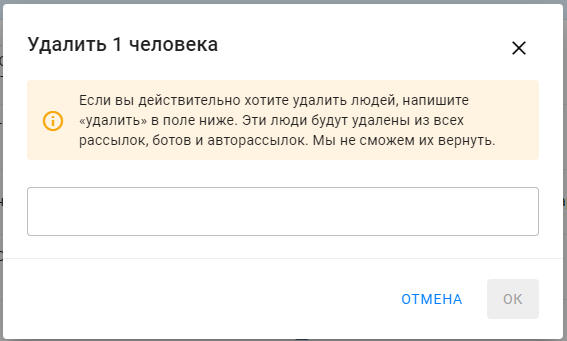
Important: subscribers will be completely deleted from the database. They will have to subscribe again before you can send them messages.
Type the confirmation word shown in the windowto continue.
It may take a few minutes for the subscribers to be deleted. After that, they disappear from the list.
* Belongs to Meta, an extremist organization banned in Russia.
If you did not find the answer to your question, feel free to contact us in the chat inside your dashboard, message us on Telegram at BotHelpSupportBot or email us at hello@bothelp.io
Enjoy the full functionality of the BotHelp platform for creating broadcasts, automated funnels, and chatbots — free for 14 days.
Sign up for BotHelp
Get 14 days of full access for free — enough to build your first bot and test it on real subscribers.
Create account
Была ли статья полезна?

